Apple Watch guide
Can you use an Apple Watch as a pet tracker?
Yes, but with important limits. An Apple Watch can contribute useful activity context when it is fitted to a pet and paired with an iPhone. It is not a GPS collar, a complete behavior diary, or a medical monitor.
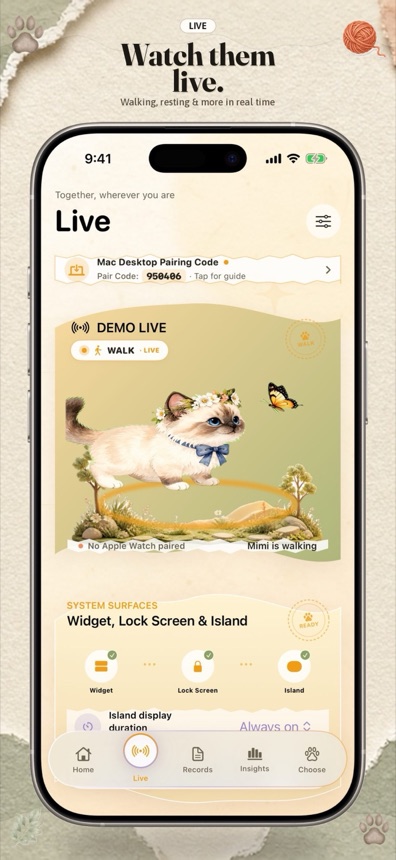
Short answer: an Apple Watch can help estimate some everyday activity from motion and sound signals, but it cannot reliably identify every behavior, locate a pet outdoors, or diagnose illness. Treat the output as a prompt for observation, not as a medical result.
Why people try an Apple Watch for this
Dedicated pet wearables often combine a collar attachment, motion sensors, GPS, and a subscription. A Watch is different. It is a general-purpose computer designed to be worn on a human wrist, with its own battery, software limits, and permission model.
That makes the idea appealing for a specific use case: someone already has an Apple Watch and wants a lightweight way to add activity context to a pet journal. The tradeoff is that the Watch was not designed as a pet collar, so comfort, fit, battery life, and behavior recognition all need more caution.
What an Apple Watch can reasonably contribute
Motion and rest context
Accelerometer and motion data can show that a device moved, stayed still, or changed orientation. When combined with software, those signals can support broad estimates such as activity or rest. They are not proof of a specific behavior. A pet shifting position, scratching, being picked up, or riding in a car can all produce motion without walking.
Short on-device sound analysis
Some apps use brief microphone windows to look for supported sound patterns. Furroam analyzes short sound windows on the Watch and does not save or upload the raw audio. This keeps the privacy surface smaller, but it also means there is no recording to listen back to later.
A timeline of paired observations
The most useful result is often not a single automatic label. It is the combination of an estimate with a manual note. For example, a period of activity plus a note that the dog was pacing after visitors gives you something meaningful to discuss later. A label without context can be misleading.
What an Apple Watch cannot promise
- Outdoor location tracking. A GPS-capable Watch is not a replacement for a purpose-built pet GPS collar. Signal, battery, connectivity, and app background limits all matter.
- Every behavior. Eating, drinking, toileting, grooming, pain, and anxiety are difficult to infer from motion alone. Any automatic label can be wrong.
- Medical diagnosis. Activity estimates do not measure pain, illness, or emotional state. If a pet's behavior changes, contact a veterinarian.
- Unlimited background monitoring. Battery and operating-system behavior can change how often data is available. The app should remain honest when it is not actively receiving updates.
- Perfect fit across pets. Body shape, coat, collar tightness, attachment method, and movement all affect sensor data. A comfortable, secure setup matters more than squeezing out a signal.
How Furroam approaches the connection
Furroam starts with the virtual companion and the journal. A compatible Apple Watch is an optional extension, not a requirement. When connected, supported movement and sound signals can update the companion and add activity estimates to the pet's day.
Manual entries, Watch-based estimates, and simulated companion behavior are labeled separately. This matters because they are not equivalent sources of information. Manual notes reflect what you observed. Watch events are estimates. Simulated behavior belongs to the digital companion's own routine.
If the Watch is unavailable, the journal and companion keep working. That design is intentional: the product should not pretend that an activity estimate is a complete record of the pet's day.
A practical setup checklist
- Confirm that the Watch model, iPhone, and watchOS version are compatible with the app.
- Use a secure, comfortable attachment that is appropriate for the pet and does not restrict movement or breathing.
- Review the permissions the app requests and understand what each one enables.
- Start with a short observation period, then compare the timeline with what you actually saw.
- Keep manual notes for important moments. Do not rely on automatic labels as the only record.
- Watch battery level and charging behavior. A long monitoring session is not guaranteed on every device.
If you are unsure whether a particular attachment or monitoring routine is safe for your pet, ask a veterinarian or an experienced pet-care professional. Software should not decide whether a physical setup is appropriate.
Privacy questions to ask
Pet monitoring can involve movement, location-adjacent context, microphone permissions, and behavioral records. Ask whether the app stores raw audio, where records sync, how long logs remain, and how to delete them.
Furroam states that raw microphone audio is not saved or uploaded, while derived events can synchronize with paired devices and private iCloud. Apple handles purchases, and Cloudflare provides video delivery infrastructure. The privacy policy explains the current data flow in more detail.
The useful mental model
Think of an Apple Watch as a small source of context, not as an automatic truth machine. It can help you notice patterns, keep a more consistent journal, and connect a real pet's day to a companion on your screen. It cannot tell the whole story by itself.
That limitation is not a reason to avoid the product. It is a reason to design the product around clarity, manual context, and honest language. A calm estimate plus a useful journal is often more valuable than an overconfident label.
Next step: see how Furroam handles optional Apple Watch updates in the product overview, or start with the manual pet journal.